


Daily Weather Alarm - Radar
3.049.00 Reviews
App Specs
- Version
- 1.4.0
- Updated On
- License
- Free
- Downloads
- 100,000+
- Developer
- X5 Network Area
- Categories
- Weather
- Platform
- Android
Screenshots
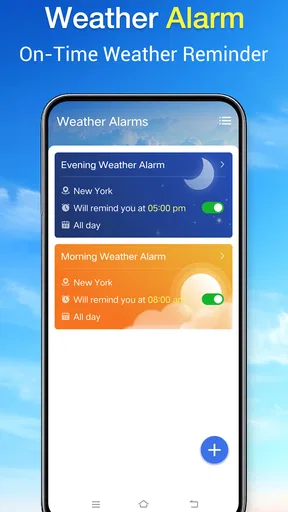
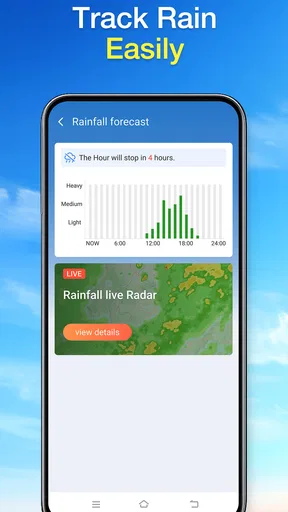
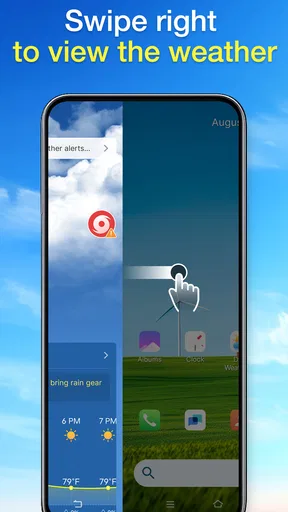
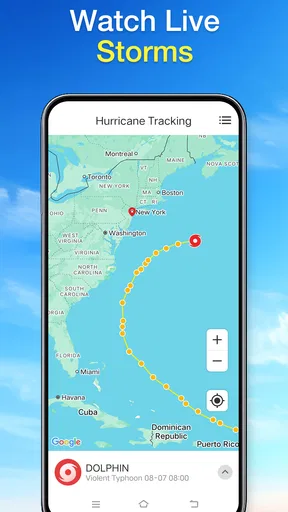
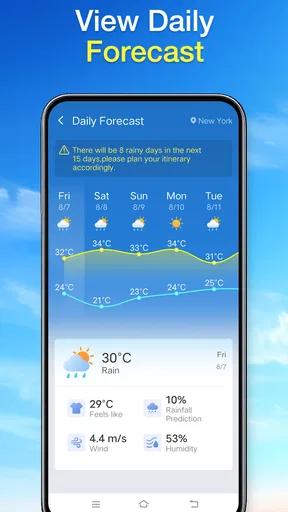
 Analysis by AppCompare
Some mornings, checking the weather is not about curiosity; it is about deciding whether to walk, drive, carry an umbrella, or change the day’s plan. Daily Weather Alarm - Radar is aimed at that small but recurring decision. I approached it as a practical weather app rather than a source for detailed meteorological analysis, and that distinction matters: its value depends on whether it helps you make a useful next move without turning a quick check into another task.
Choosing a forecast for the day ahead
For a routine such as walking a dog, cycling to work, or taking children to school, I want a weather check to fit into the decision I am already making. I would open Daily Weather Alarm - Radar with one question in mind, then decide whether its view is clear enough to act on. This keeps a quick check useful instead of turning it into a hunt for every possible weather detail.
It can also help to think about the cost of being wrong. If the consequence is carrying an unnecessary umbrella, a broad outlook may be enough. If the consequence is arriving late, getting caught in a downpour far from shelter, or changing an outdoor work plan, I would seek more specific, current information before committing. That distinction is one of the most useful habits I bring to any forecast: match the level of confidence I need to the stakes of the choice.
From a weather question to a workable plan
I find it helpful to begin with the choice I need to make, rather than treating a forecast as a promise: what should I carry, and when should I check again? That keeps a quick weather glance tied to a real plan and makes it easier to notice when the decision deserves a more specialized source. Next, I look at how that simple check can lead into a practical routine.
Start with the decision you actually need to make
When I open a weather app, I usually have a particular question in mind: Is it worth hanging laundry outside? Should I bring a rain jacket? Is a planned walk likely to be comfortable? Daily Weather Alarm - Radar makes most sense when used in that direct, everyday way. Its identity is straightforward: it is a free weather app from X5 Network Area, with “Daily Weather” as its short description and a store summary that presents it as a daily assistant.
That modest framing is useful. Weather apps can become crowded with maps, charts, alerts, and extra layers of information, but more detail does not always make a decision easier. I would treat this app as a convenient place to begin a routine check, then judge whether the information shown answers the question at hand. If you need a specialist view of storms or a carefully reasoned forecast for a complicated trip, a basic daily companion may not be enough on its own.
The name includes “Alarm” and “Radar,” which naturally invites expectations about alerts and radar tools. I would not assume that the name alone guarantees a particular alert schedule, map layer, or notification setup. Instead, I would check what the installed version actually offers and use only the options that are clearly available. That is a sensible first step with any weather app: confirm the information on screen before building an important plan around it.
Worth Reading Before You Choose

Baby Panda World Brings Quick Play to Modern Phones, but Its Game Library Feels Busy

ESPN’s Live Game View Makes Following Close Games Easier

QuizzLand Review: A Good Fit for Short Trivia Breaks, Not Every Player

Basketball Stars: Multiplayer Is Fast, but Can It Recover When Matches Go Wrong?

WEBTOON Turns Phone Updates Into a Better Reading Routine

Link to Windows Runs on Shared Habits, Not Social Feeds
Build a repeatable morning check
My most useful workflow for an app like this is deliberately simple. I check the local conditions before getting dressed, look at the day’s outlook, and then make one concrete choice: what to wear, what to pack, or whether to adjust the timing of an outdoor errand. The benefit is not just seeing weather information; it is connecting it to a decision while there is still time to change course.
For example, imagine a weekday with a walk to a bus stop, a few hours indoors, and a grocery run on the way home. I would check the app before leaving, note whether rain or a temperature change could affect the return trip, and choose a jacket or umbrella accordingly. If the forecast seems uncertain, I would avoid treating a single glance as a guarantee and check again before the later outing. That second check is a useful habit, not a claim that the app updates on any particular schedule.
A small but often overlooked tip is to separate “today’s overall picture” from “the next few minutes.” The first helps with clothing and plans; the second is what matters when you are about to set off. If Daily Weather Alarm - Radar presents information at different time horizons, use the one that matches the decision rather than scanning everything. If it does not show the detail you need, switch to a weather service that does instead of trying to infer more than the screen supports.
Turn the forecast into a handoff
A weather check often affects someone besides the person holding the phone. I might tell a family member to take a coat, move a shared outdoor plan, or let a coworker know I would rather meet indoors. In that sense, the app’s job is only the first part of the workflow: it helps me form a view, but I still need to communicate that view clearly and leave room for changing conditions.
I find it useful to pass on a decision rather than a vague forecast. “Let’s take the covered route” is more actionable than forwarding a screen and expecting someone else to interpret it. This approach also prevents a common problem with weather apps: one person reads a broad daily outlook as a promise, while another understands it as a possibility. For plans involving other people, I would describe the practical implication and check again closer to the event.
The same thinking helps when moving between apps. A weather screen can inform a calendar plan, a commute choice, or a message, but it does not automatically resolve those tasks. I would use Daily Weather Alarm - Radar for the weather part, then use the relevant map, calendar, or messaging app for the handoff. That division keeps expectations realistic and makes it easier to notice when a different tool is better suited to the next step.
What I would want from the result
After checking the forecast, I want to feel that I can make a reasonable choice—not that I have gained perfect certainty. If the app helps me decide to carry a light layer, postpone a picnic, or leave extra time for a wet commute, it has done something useful. That practical measure is more meaningful to me than how many weather details fit on one screen.
The app has an average rating of 3.7 from around eighty ratings, alongside roughly twenty written reviews. I read that as a modest, early signal rather than a decisive verdict: there is some user feedback to consider, but it is not enough to tell every person exactly how the app will fit their routine. Its audience is listed at over ten thousand installs, which suggests it has reached a real group of users without making it an established default for everyone.
Daily Weather Alarm - Radar is free, and its content rating is Everyone. The current version is 1.3.0, and the listed minimum operating-system requirement is version 8.0. Those details make it straightforward to consider if your device meets that requirement, but compatibility alone does not answer the more important question: does the app show the kind of local forecast information you rely on? I would test it during ordinary days before trusting it with a time-sensitive outdoor plan.
Where a quick workflow can break down
The main limitation I would keep in mind is that the simple “check, decide, go” routine only works when the app’s presentation matches the decision. A general daily view may be enough to choose clothing, yet too broad for deciding whether to cross town during a passing shower. Radar-oriented expectations also need care: if a map or alert feature is important to you, verify that it is present and clear in the version you install rather than relying on the product name.
Weather itself is another source of friction. Conditions can shift, forecasts can be uncertain, and a screenshot shared earlier in the day can quickly become stale. I would not use any single check as the sole basis for a safety-critical decision, such as whether severe conditions make travel advisable. For those situations, consult authoritative local weather and emergency guidance, and use a service that clearly provides the specific warnings you need.
There is also a difference between a useful glance and a complete planning tool. People who want detailed hourly comparisons, long-range planning, specialist radar layers, or extensive customization should compare this app with established weather services that clearly explain those capabilities. I would not keep searching through a lightweight daily app for advanced controls it may not be designed to provide. Choosing a tool by the decision it supports is faster than expecting one app to cover every weather-related task.
Who is likely to find it useful
I would consider Daily Weather Alarm - Radar if I wanted a no-cost weather app for routine checks and preferred a simple starting point over a dense forecasting dashboard. It is most appealing to someone who makes small daily choices—what to wear, whether to pack rain gear, or whether to shift an errand—and is comfortable checking conditions again when plans depend on them.
I would be more cautious if my routine depends on precise short-term storm tracking or if I need detailed forecast comparisons for outdoor work, travel, or events. In those cases, I would choose a weather service whose specific map, alert, and timing tools I can verify for myself. The same applies if I already have a trusted app that fits my habits: switching is worthwhile only if this one makes the check clearer or more convenient.
A sensible place in a weather routine
Compared with the usual alternatives, I see this as a candidate for a straightforward daily check, not a replacement for every weather source. A built-in phone weather app may be more convenient if you already rely on it, while a specialist service is a better fit when you need to inspect radar or compare forecasts in detail. I would try this app when I want a separate, free option, then keep whichever tool gives me the clearest answer with the least effort.
One practical way to judge it is to use the same small test for a few ordinary days: check before leaving, decide what to wear or carry, and see whether the information answers that question without extra searching. Then try it once when plans involve another person, and once before an outdoor errand later in the day. Those comparisons reveal whether it fits your actual routine better than a glance at a default forecast, without asking you to trust it with a high-stakes plan straight away.
If you are deciding whether to install it, the short answer is that it suits people who want a no-cost starting point for everyday weather choices and are willing to verify details when conditions matter. It is less suited to anyone who needs dependable, specialized forecasting controls as part of work or travel. The important question is not whether it can replace every other weather app, but whether its own forecast is clear enough for the decisions you make most often.
Daily Weather Alarm - Radar is a practical candidate for the first link in a daily planning chain, not a substitute for judgment or every other weather tool. I would give it a place in my routine if its on-screen forecast answers my everyday questions, then keep the handoff simple: make a decision, tell anyone affected, and recheck when the plan is time-sensitive. That is where this app’s promise is most useful: turning a quick weather check into a sensible next step.
Pros
- Combines weather updates with customizable wake-up alarms.
- Radar imagery helps visualize approaching rain and storms.
- Useful for planning outdoor activities before leaving home.
- Alarm scheduling can support different weekday routines.
- Weather alerts may help you prepare for changing conditions.
Cons
- Forecast and radar accuracy can vary by location and data source.
- Some features or alerts may require an internet connection.
- Frequent notifications can become distracting if not adjusted.
- Weather information may be less detailed in rural areas.
- Battery use may increase if location access runs continuously.
FAQs for Daily Weather Alarm - Radar
What does Daily Weather Alarm - Radar do?
Daily Weather Alarm - Radar combines weather information with alarm features, helping you check conditions and plan your morning in one place. Depending on the version and your location, it may show forecasts, radar imagery, and weather details alongside alarm settings. Check the app’s listing and permissions before installing, since available forecasts, radar coverage, and features can vary by region and app version.
Can I use Daily Weather Alarm - Radar as my regular alarm clock?
The app is intended to provide alarm functionality alongside weather information, but its reliability can depend on your device, operating-system settings, and the way alarms are handled in the background. Before relying on it for an important wake-up, set a test alarm and confirm that notifications and background activity are allowed. Keeping a backup alarm is sensible, especially after updates or when using battery-saving modes.
Does Daily Weather Alarm - Radar provide accurate weather forecasts and live radar?
Forecast accuracy and radar availability depend on the data sources used by the app, your location, and how frequently information is refreshed. Radar maps may not be available everywhere or may show delayed or limited coverage, so they should not be treated as a substitute for official severe-weather alerts. Compare important forecasts with a trusted local weather service, particularly when making safety-related decisions.
Is Daily Weather Alarm - Radar free, and does it include ads or in-app purchases?
The cost and business model can differ by platform, country, and app version. Review the current Google Play or App Store listing to see whether the download is free, whether advertising is shown, and whether subscriptions or one-time purchases unlock additional features. Also check the billing terms before confirming a purchase, since pricing and trial conditions may change over time.
What permissions and privacy considerations should I check before installing it?
A weather app may request location access to show local conditions, while alarm and notification features may need permission to send alerts or run in the background. Grant only the access needed for the features you plan to use; approximate or manually selected locations may be enough for some users. Read the store’s privacy information and the developer’s policy to understand what data is collected, shared, or retained.


